Full package for offline update
64-bit Windows
Most desktops and laptops
SHA-256923589e9129eda168cf820050faf1782f8d4a8c4aed80734bce980b34cc6ab4c
Windows on ARM
Surface Pro X, Snapdragon laptops
SHA-2562611dd37e5d375e08cc4dc414551791f54086c051b894be252424efc22d3e501
Most PCs are 64-bit. If unsure, open Settings → System → About in Windows and check “System type”.
The full package is refreshed once a day, so its version (1.463.403.0) may trail the latest (1.463.417.0) a little. Once that PC gets online, Padideban fetches the rest automatically.
Install it with Padideban
Where in the app Updates Offline update Choose file…
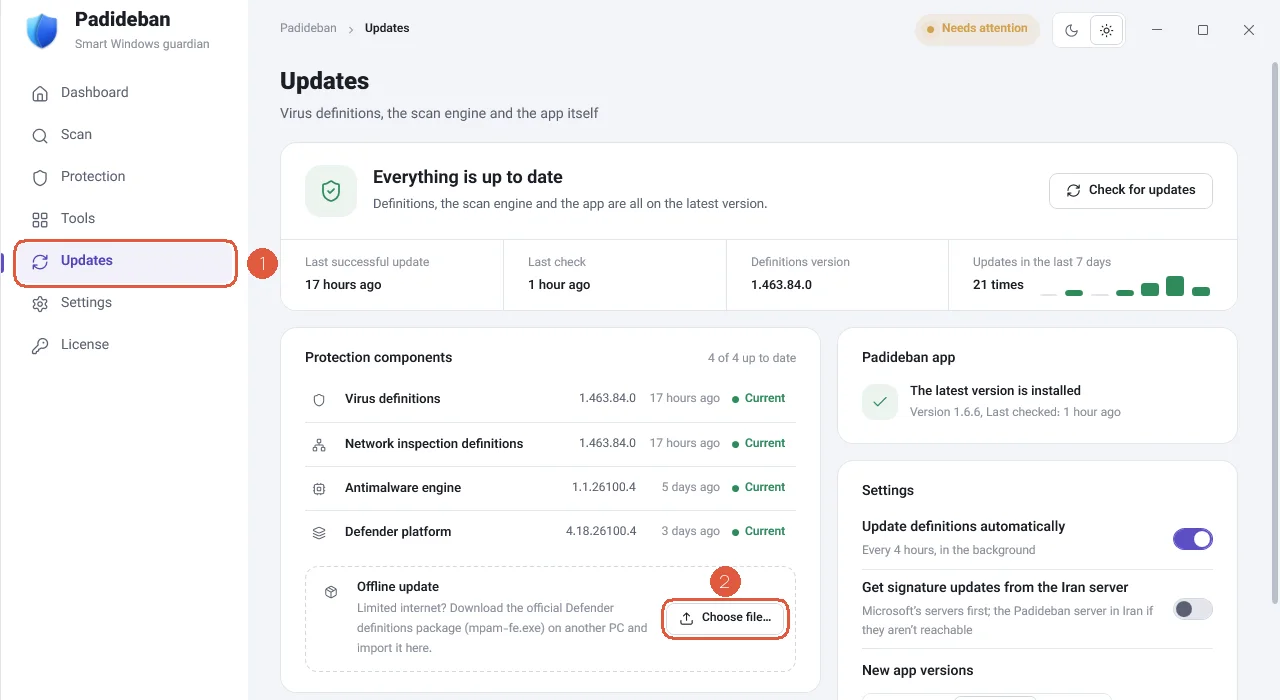
- On a computer with internet, download the right update file above. The file is named mpam-fe.exe.
- Copy it to the offline PC with a USB drive or any other way.
- In Padideban, open “Updates” from the side menu (1 in the picture), click “Choose file…” under “Offline update” (2), then pick that file.
- Padideban checks the file’s digital signature and, if it is the official Microsoft package, installs it silently. The new version shows on the same page.
Definition updates — automatic or offline — are part of the free edition and need no license.
Automatic updates
If the PC is online there’s nothing to do: Padideban keeps the definitions current automatically.