Protection modules and attack surface reduction (ASR)
All modules on one page, plus advanced attack surface reduction rules.
In this article
Three settings sections work directly on the layers of protection: “Protection modules” turns all of Padideban’s modules on and off, “Defender protection” controls Microsoft Defender’s own settings, and “Attack surface (ASR)” manages advanced Windows rules. “Exclusions” is also explained here.
Protection modules
Where in the app Settings Protection modules
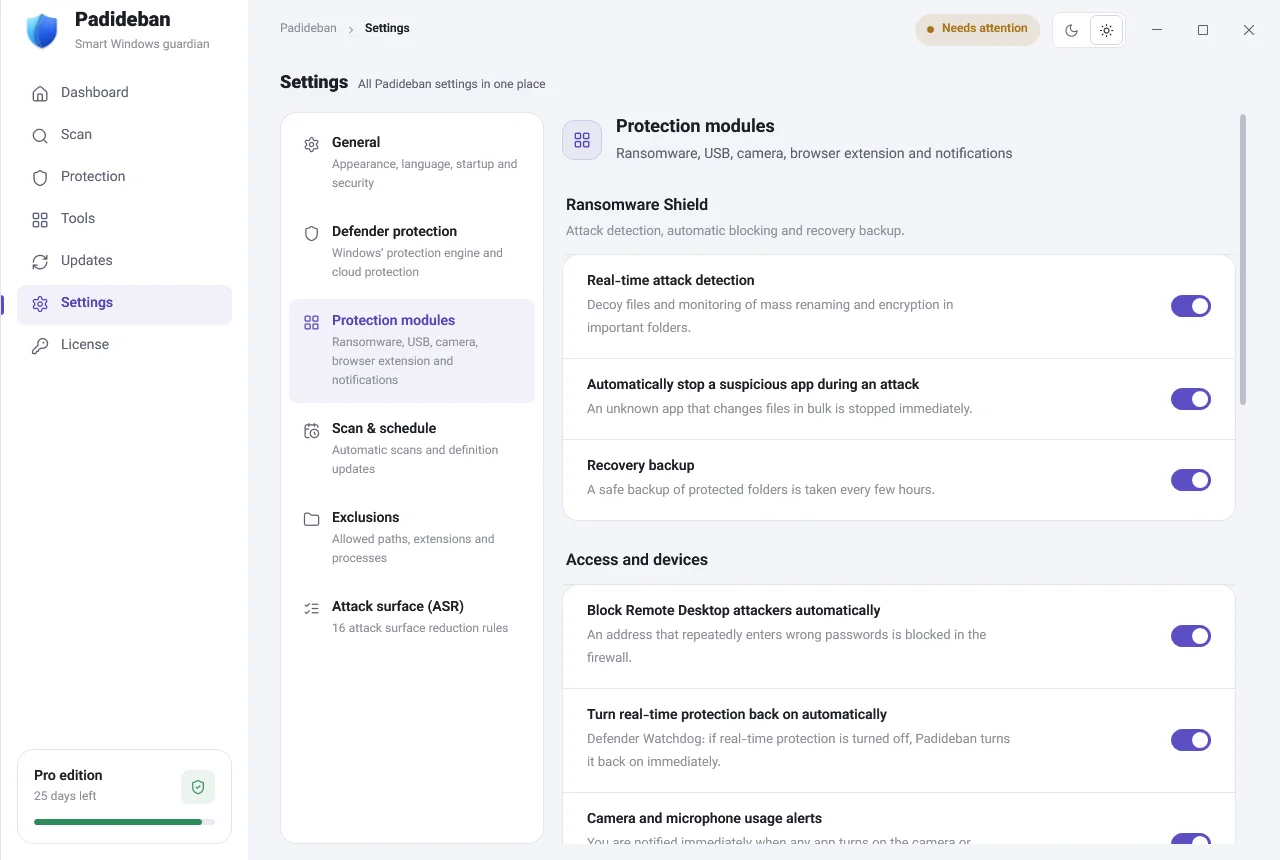
This is where you turn all of Padideban’s protections on and off in one place. The switches for each module, such as “Real-time attack detection” and “Recovery backup” in Ransomware Shield, or “Block attackers automatically” in Remote access, are also here, and they stay in sync with the module’s own page.
- “Notifications from Padideban only”: Windows Security notifications and its icon in the notification area are hidden, so you don’t get duplicate alerts. Defender itself isn’t touched, and everything goes back to normal if you uninstall Padideban.
- “Startup message when Windows starts” and “Automatic weekly report” are in this section too.
Defender protection
Where in the app Settings Defender protection
In the protection settings, changes are applied to Microsoft Defender and verified immediately. There are two main groups: “Real-time protection and scanning” (such as real-time protection, behavior monitoring, checking downloaded files, and scanning scripts and archives) and “Advanced protection” (cloud, network and anti-ransomware protection).
Attack surface (ASR)
Where in the app Settings Attack surface (ASR)
This page manages Microsoft Defender’s 16 advanced attack surface reduction rules, which block common ransomware techniques such as running programs from email attachments, malicious Office macros, or stealing passwords from Windows memory. The top of the page shows how many of the 16 rules are active.
Choose one of four modes for each rule, or set them all at once with the “Quick setup” row:
- “Block”
- The dangerous action doesn’t happen.
- “Warn”
- Windows asks before the action goes ahead.
- “Audit only”
- Nothing is blocked; Windows only logs what would have been blocked.
- “Off”
- The rule is turned off.
Exclusions
Where in the app Settings Exclusions
If a safe program keeps getting quarantined or is slow to scan, you can exclude it from scanning. There are three lists: “Files and folders”, “File extensions” and “Programs (processes)”. Add an item with “Add” or “Browse…”, and take it off with “Remove”.